⚡ TL;DRAzure Virtual WAN and Hub-and-Spoke are the two dominant network architectures for enterprises on Azure. The right choice depends on your scale, complexity, operational maturity, and — most importantly — where you expect to be in three years.
- The Hub-and-Spoke Model
- Azure Virtual WAN
- Decision Matrix
- Migration Path: Hub-and-Spoke to Virtual WAN
- Real-World Recommendation for 2026
Azure Virtual WAN and Hub-and-Spoke are the two dominant network architectures for enterprises on Azure. The right choice depends on your scale, complexity, operational maturity, and — most importantly — where you expect to be in three years. This guide breaks down the decision with real architecture diagrams, cost models, migration paths, and the trade-offs I have seen across dozens of Azure engagements in Southeast Asia.
If you are starting a new Azure landing zone in 2026, the default answer is probably Virtual WAN. But that “probably” carries a lot of nuance. Let me walk through both options so you can make an informed decision for your specific context.
The Hub-and-Spoke Model
Hub-and-spoke is the traditional Azure networking pattern. A central hub VNet hosts shared services (Azure Firewall, VPN Gateway, DNS, Azure Bastion) and connects to spoke VNets via VNet peering.
Architecture
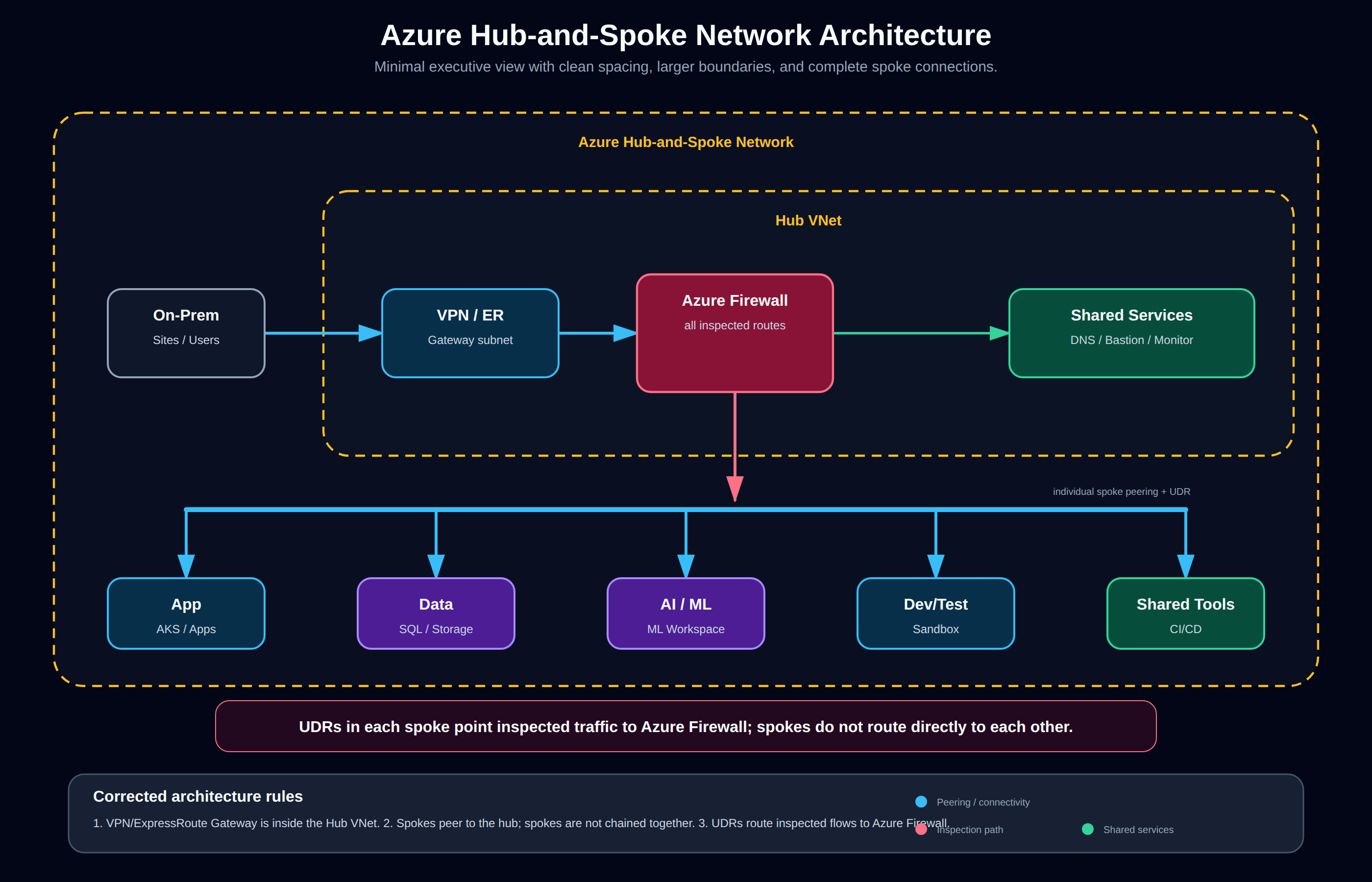
The corrected architecture places the VPN/ExpressRoute Gateway inside the Hub VNet, with Azure Firewall acting as the central inspection point. Shared services such as Private DNS, Bastion, and monitoring sit in the hub. Each workload spoke is individually peered to the hub and uses user-defined routes where inspected traffic must traverse Azure Firewall; spokes are not chained together.
Each spoke is a separate VNet with its own subnets, NSGs, and route tables. Traffic between spokes must traverse the hub, where Azure Firewall enforces inspection. This design is well-understood, well-documented, and has been the recommended pattern since Azure first supported VNet peering.
When Hub-and-Spoke Wins
- Small to medium deployments — under 40-50 spoke VNets. VNet peering limits (500 per VNet in a region) mean you eventually hit scale limits.
- You need granular routing control — custom user-defined routes (UDRs), per-spoke firewall policies, and fine-grained traffic engineering. Virtual WAN abstracts much of this away.
- Your team has deep networking expertise — hub-and-spoke requires understanding BGP, UDRs, peering transitive routing limitations, and Azure Firewall policy hierarchies.
- Cost sensitivity — no Virtual WAN hub charges. At small scale, hub-and-spoke is cheaper by $200-600/month.
- Single region — multi-region hub-and-spoke is possible but complex. Each region needs its own hub with inter-hub peering or ExpressRoute Global Reach.
Cost Model
Hub-and-spoke costs are straightforward:
| Component | Cost Estimate |
|---|---|
| VNet peering (within region) | ~$0.01/GB ingress/egress (usually negligible) |
| Azure Firewall | ~$1.25/hr + $0.065/GB processed |
| VPN Gateway (Active-Active) | ~$0.25/hr |
| ExpressRoute Gateway | ~$0.70/hr (1 Gbps) |
| Typical monthly (small) | ~$600-2,000 depending on firewall throughput |
No per-VNet platform fee. The cost scales linearly with spoke count through peering data transfer charges.
Limitations I Have Hit in Production
- Peering limit: You can peer a maximum of 500 VNets to a single hub VNet. Beyond that, you need a multi-hub architecture.
- Non-transitive peering: VNet peering is non-transitive. Spoke A cannot route to Spoke B through the hub unless you add UDRs on each spoke pointing to the firewall as the next hop. This works, but it is manual to configure at scale.
- Complex multi-region: Each region needs its own hub. Connecting hubs requires additional peering or ExpressRoute circuits.
- Firewall bottleneck: All inter-spoke traffic flows through the single hub firewall. At scale, this becomes a throughput bottleneck.
Azure Virtual WAN
Virtual WAN is Microsoft’s managed wide-area networking service. It provides automated hub deployment, built-in routing, integrated VPN/ExpressRoute gateways, and centralized management through a single control plane.
Architecture
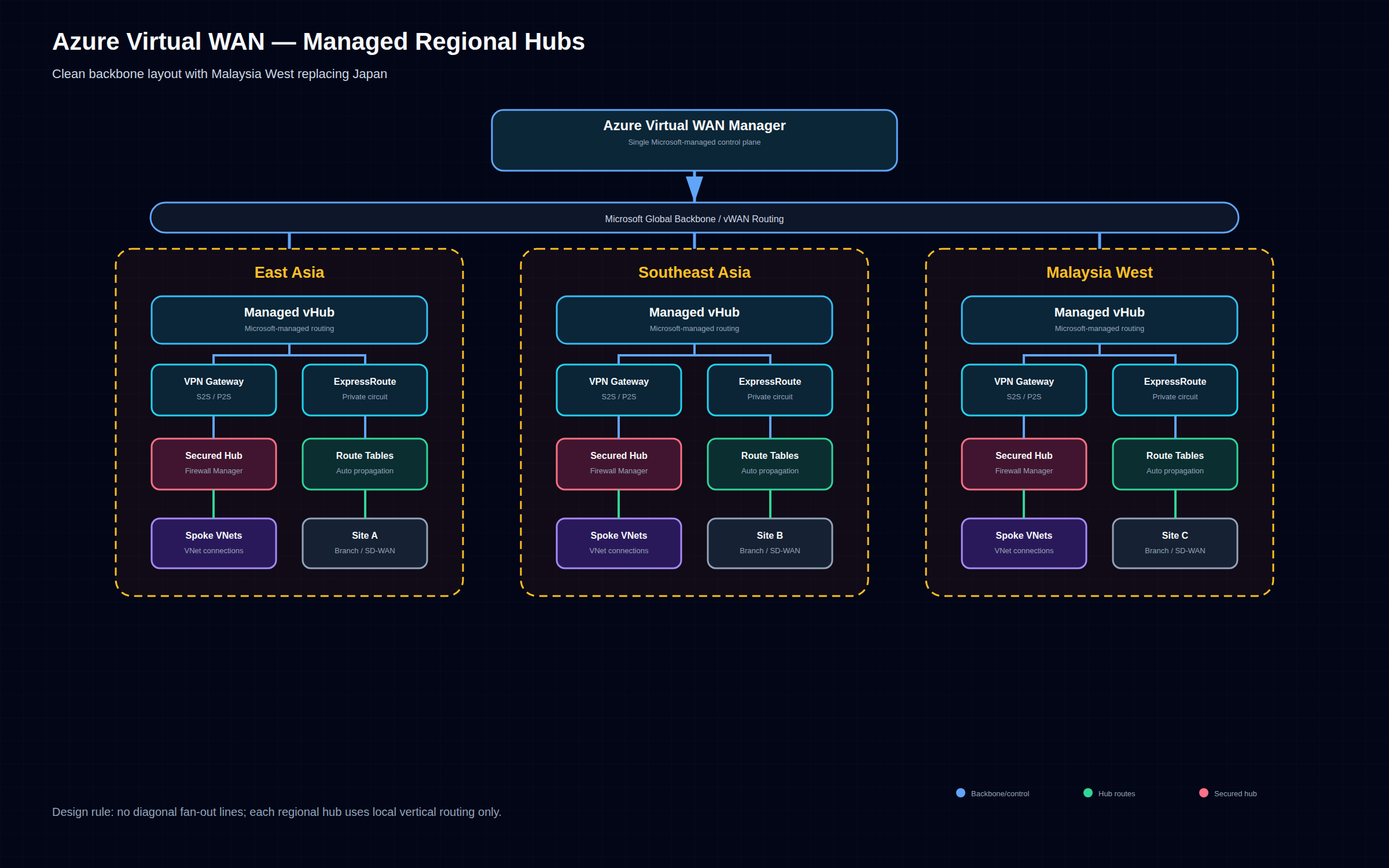
The corrected Virtual WAN architecture uses a Microsoft-managed control plane to operate regional virtual hubs. Each hub provides managed routing, gateway scale units, optional secured hub integration through Azure Firewall Manager, spoke VNet connections, and branch or SD-WAN connectivity over the Microsoft backbone.
Each regional hub is a managed infrastructure that includes:
- VPN gateway for site-to-site and point-to-site connectivity
- ExpressRoute gateway for private connectivity
- Azure Firewall Manager integration for secured hubs
- SD-WAN integration via NVA partners such as Fortinet, Cisco, and Palo Alto
- Automatic routing tables and route propagation
When Virtual WAN Wins
- Large scale — 50+ spoke VNets across multiple regions. Virtual WAN handles routing at scale without hitting peering limits.
- Multi-region deployments — hub-to-hub connectivity is automatic. ExpressRoute circuits in different regions are connected without manual peering.
- Branch office connectivity — built-in SD-WAN integration with partners like VMware SD-WAN, Cisco vEdge, and Fortinet SD-WAN.
- Limited networking team — Virtual WAN abstracts away most routing complexity. Azure manages the hub infrastructure.
- Global transit — Virtual WAN acts as a global transit network. Traffic between East Asia and Southeast Asia hubs routes through the Microsoft backbone, not the public internet.
Cost Model
Virtual WAN pricing is different from hub-and-spoke:
| Component | Cost Estimate |
|---|---|
| Virtual WAN hub (standard) | ~$0.25/hr per hub |
| VPN Gateway (in-hub) | ~$0.36/hr (per scale unit) + $0.05/hr (per connection unit) |
| ExpressRoute Gateway (in-hub) | ~$0.42/hr (2 Gbps per scale unit) |
| Data transfer between hubs | Standard inter-region rates |
| Typical monthly (3 hubs, 60 spokes) | ~$1,500-3,500 |
The key insight: Virtual WAN has a higher base cost but better per-unit economics at scale. At 60+ spokes, Virtual WAN is typically cheaper than an equivalent hub-and-spoke setup because you eliminate redundant gateway VMs and manual peering management.
What Virtual WAN Does Not Do Well
- Granular routing control: Virtual WAN’s routing model is simpler than hub-and-spoke but less flexible. You work with route tables and connections — no custom UDRs per spoke.
- Small deployments: Under 20 spokes, you are paying hub charges for minimal benefit.
- Non-standard topologies: If you need exotic routing patterns (e.g., selective inspection for specific spokes, asymmetric routing), hub-and-spoke gives you more control.
- Migration complexity: Moving from hub-and-spoke to Virtual WAN requires careful planning. The attach-then-decomission approach works but has a period of dual-running costs.
Decision Matrix
| Factor | Hub-and-Spoke | Virtual WAN |
|---|---|---|
| Scale ceiling | ~500 VNets per hub (peering limit) | 1000+ VNets across hubs |
| Regions | Single region (multi-region complex) | Built-in multi-region |
| Team expertise required | High (routing, BGP, UDRs) | Medium (routing tables, connections) |
| Cost (20 spokes, 1 region) | ~$800-1,200/mo | ~$1,000-1,500/mo |
| Cost (100 spokes, 3 regions) | ~$4,000-7,000/mo | ~$2,500-4,500/mo |
| Branch/SD-WAN integration | Manual (VPN GW + third-party) | Built-in via Virtual WAN partners |
| Firewall integration | Azure Firewall in hub VNet | Azure Firewall Manager in hubs |
| Routing model | UDRs + BGP | Route tables + connections |
| Deployment speed | Days-weeks (manual config) | Hours (managed deployment) |
| SLA for control plane | None (self-managed) | 99.95% for hubs |
Migration Path: Hub-and-Spoke to Virtual WAN
Most organisations start with hub-and-spoke and migrate to Virtual WAN when they hit multi-region or scale requirements. The migration is well-documented and non-disruptive if done correctly.
Step-by-Step Migration
Phase 1: Deploy Virtual WAN alongside existing hub-and-spoke
Phase 2: Attach spokes to Virtual WAN hubs (dual connectivity)
Phase 3: Route traffic through Virtual WAN
Phase 4: Decommission self-managed hub
Phase 1 — Deploy Virtual WAN
# Create Virtual WAN
az network vwan create \
  --name wenfeng-vwan \
  --resource-group rg-networking \
  --type Standard \
  --location southeastasia

# Create regional hub
az network vhub create \
  --name seasia-hub \
  --resource-group rg-networking \
  --vwan wenfeng-vwan \
  --address-prefix 10.100.0.0/24 \
  --location southeastasia
Phase 2 — Attach spokes
# Connect existing spoke VNet to Virtual WAN hub
az network vhub connection create \
  --name spoke-app-conn \
  --resource-group rg-networking \
  --vhub-name seasia-hub \
  --remote-vnet /subscriptions/.../resourceGroups/rg-app/providers/Microsoft.Network/virtualNetworks/app-vnet \
  --internet-security true
Phase 3 — Route migration
Gradually shift traffic by updating route tables. Keep the existing hub active until all spokes are migrated. This is the safest approach — you can roll back a spoke at a time if something breaks.
Phase 4 — Decommission
Once all spokes are attached and traffic flows through Virtual WAN: 1. Remove VNet peerings from the old hub 2. Delete the old hub resources (Azure Firewall, VPN Gateway, DNS VMs) 3. Delete the hub VNet
The critical rule: never delete the old hub until all spokes are confirmed working through Virtual WAN.
Common Migration Pitfalls
- Route propagation delays: After attaching spokes, route propagation can take 2-5 minutes. Schedule migrations during maintenance windows.
- Firewall policy drift: If you use Azure Firewall with custom rules in hub-and-spoke, those rules need porting to Azure Firewall Manager policies before the migration.
- IP address overlap: If your hub VNet addresses overlap with Virtual WAN hub addresses, you need re-addressing before migration.
- VPN/ExpressRoute disconnect: When you transition site-to-site VPN connections from the old hub gateway to the Virtual WAN gateway, expect a brief disconnect. Use BGP to minimise disruption.
Real-World Recommendation for 2026
Greenfield (Starting Fresh)
Use Virtual WAN from day one unless you are: – A single-region deployment with under 20 spokes – A small team with legacy networking tooling – Running a proof-of-concept or MVP with minimal networking requirements
For 2026 greenfield deployments, Virtual WAN is Microsoft’s strategic direction. New features (like vWAN Integrated Secure Hubs and SD-WAN enhancements) typically ship on Virtual WAN first, while hub-and-spoke continues to be supported for existing deployments.
Brownfield (Existing Hub-and-Spoke)
Stay on hub-and-spoke if you are under 40 spokes and single-region. You have working infrastructure, and the migration cost exceeds the operational benefit.
Plan the migration to Virtual WAN if: – You are expanding to a second region – You are approaching 50 spokes – You are adding branch/SD-WAN connectivity – Your networking team is shrinking (or being asked to do more with less)
The Southeast Asia Context
In Malaysia and Southeast Asia, two factors tilt the decision toward Virtual WAN:
- Multi-region is common: Companies operate across Singapore, Malaysia, Indonesia, and Thailand. Virtual WAN’s multi-region hub-to-hub connectivity is a significant operational win over stitching together regional hub-and-spoke deployments with peering.
- Branch connectivity: Regional banks, retailers, and logistics companies have dozens of branches across the region. Virtual WAN’s SD-WAN integration simplifies what would otherwise be a complex VPN mesh.
Key Takeaways
- Hub-and-spoke is the default for single-region, small-to-medium deployments. It gives full control at lower cost. Do not migrate prematurely.
- Virtual WAN wins at scale — multi-region, 50+ VNets, branch offices, or when you want managed networking. The managed control plane is a significant operational win.
- Start with hub-and-spoke, migrate when you need to. The migration path is well-established. Use the attach-then-decomission approach to minimise risk.
- Cost comparison requires real sizing. Use the Azure Pricing Calculator with your actual VNet count, throughput, and gateway requirements. At 40-60 spokes, do the math both ways — the answer is not always obvious.
- Both support the same security patterns — Azure Firewall, NSGs, Private Link, and Private Endpoints work with either architecture. Do not let security concerns drive the decision.
- Your team’s networking expertise matters more than the technology choice. Virtual WAN reduces operational burden but still requires understanding of routing, VPNs, and firewall policies. Hub-and-spoke demands deeper expertise but gives more control.
- Plan for the scale you will have in 3 years, not the scale you have today. The cost of migrating from hub-and-spoke to Virtual WAN outweighs the early cost savings if you outgrow hub-and-spoke within 18 months.